
Use Health.md when you want steps, sleep, heart metrics, or workouts beside your journal and training notes. You select the health data and destination; this Obsidian folder workflow does not create a Health.md server copy of your health data.
Try a free starter vault first
No account, purchase, or health permissions are needed to explore it. All sample measurements and journal entries are fictional.
One daily note
Monday, October 19
- Steps
- 8,450
- Sleep
- 7.6 hours
- Resting heart rate
- 59 bpm
“A short walk before work. Kept the evening quiet.”
From Health/2026-10-19.md in the sample. Numeric properties sit beside a little journal context.
A completed weekly review
A week with more room to walk
October 19–25: 66,580 steps and 7.63 hours average sleep, each with 7 of 7 days observed.
“The lunch walks and Saturday outing gave this week a rhythm I enjoyed.”
A filled-in fictional example. The review table and prose do not update automatically.
A sortable log, ready to explore
Open Views/Health log.base → All days in the downloaded vault. Here are three rows from the sample; the full log has 28 notes. Sleep and heart-rate values stay numeric, with units in the column names.
| Date | Steps | Sleep (hours) | Resting heart rate (bpm) |
|---|---|---|---|
| 2026-10-19 | 8450 | 7.6 | 59 |
| 2026-10-20 | 9630 | 7.8 | 58 |
| 2026-10-21 | 7210 | 6.9 | 61 |
This is a web preview of the sample's contents, not an Obsidian screenshot. The vault includes a day with missing sleep so you can see how an absent measurement differs from zero.
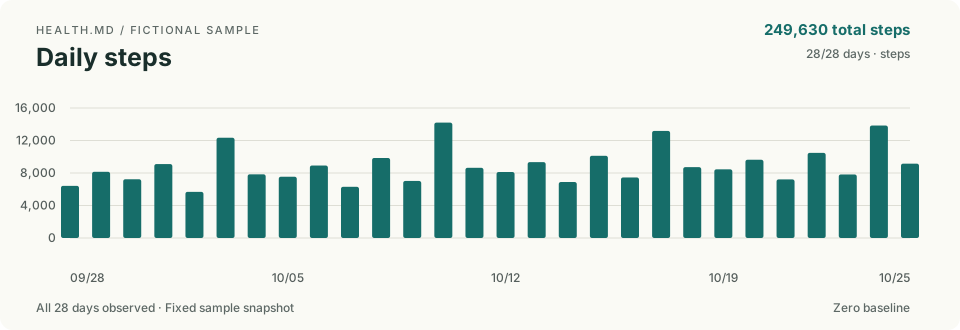
Download the free Obsidian starter vault to explore the workflow before connecting any health data. It includes 28 fictional daily notes, three chart snapshots, a sortable Bases log, a completed weekly review, and reusable review and reflection templates. No purchase or community plugin is needed to explore it.
Unzip the download, choose Open folder as vault in Obsidian, and select Health.md Starter. Start with Start here. Use Obsidian 1.12 or later; enable the built-in Bases plugin for the log. The chart images are fixed sample snapshots. An included guide explains optional interactive charts using the separately installed Health.md Visualizations plugin.
All sample measurements and journal entries are made up. When you are ready for your own data, follow the vault's Use your own data guide to keep the fictional files separate from real exports. The starter is free; the Health.md exporter has its own trial and purchase terms.
Before you start
- Install Health.md on your iPhone and make sure Apple Health contains data for the day you want.
- Open your vault in Obsidian and identify its folder in Files. Health.md needs a writable folder inside that same vault.
- Authorize the Apple Health categories you want to read. Available metrics depend on the device, OS, source data, permissions, and app version.
This guide covers Apple Health on iPhone. For Android, follow Health Connect to Obsidian; the platforms do not expose identical metrics or export profiles. For current trial and purchase details, see Health.md pricing.
Export your first real note
Keep the starter intact as a reference. Use a separate vault for your measurements, or back up your existing vault first. Copy the starter's Templates and Views if you want them; leave its fictional Health notes, completed review, and fixed charts behind. Follow Guides/Use your own data inside the download.
The app includes 5 free export actions, then a one-time lifetime unlock. The starter vault remains free.
The quick workflow
- Install Health.md on the iPhone that has access to Apple Health.
- Grant Health permissions for the metrics you want to export.
- Pick an Obsidian vault folder or another folder available through Files.
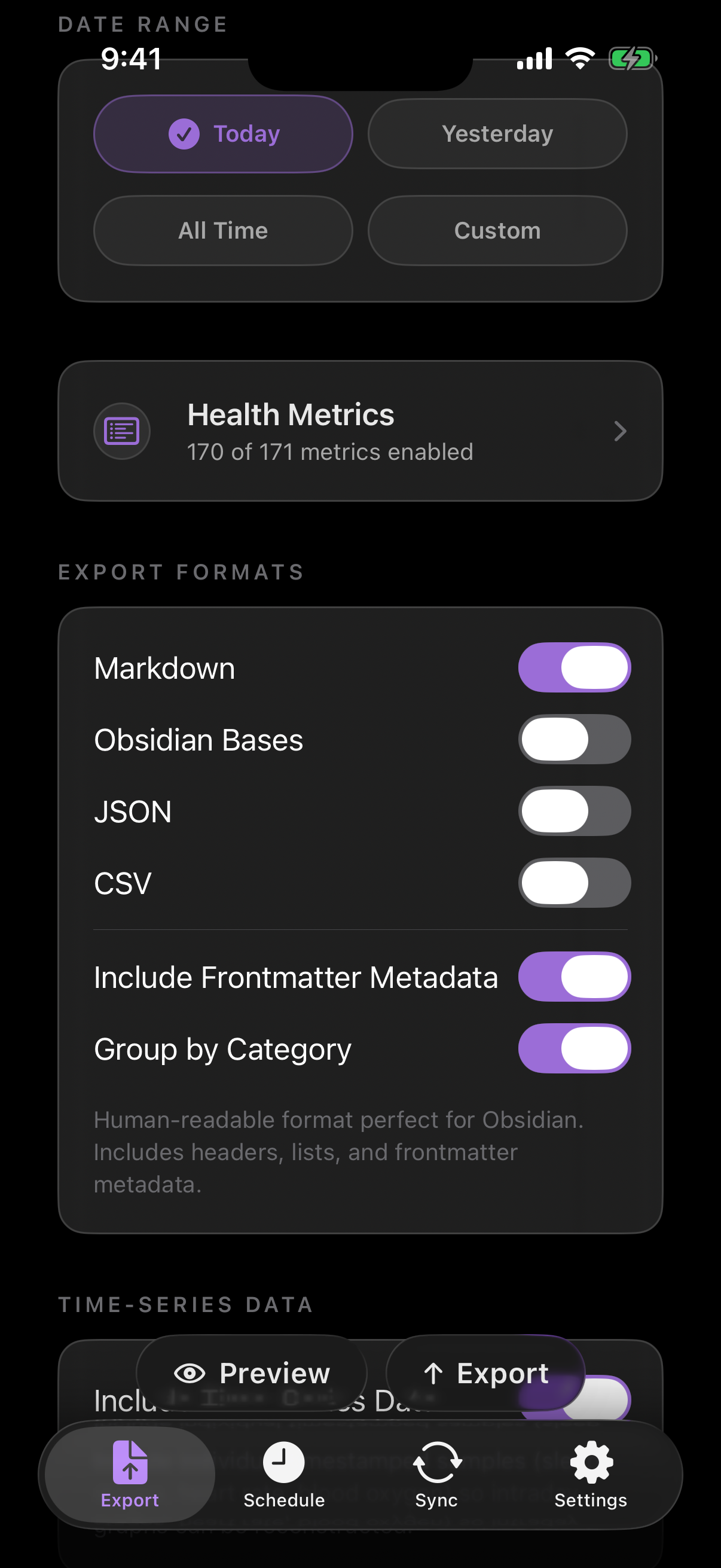
- Choose the export formats: Markdown, Obsidian Bases, JSON, CSV, or a mix.
- Start with Yesterday or a custom one-day range, tap Preview, then Export Data. Review the result and open the file in Obsidian.
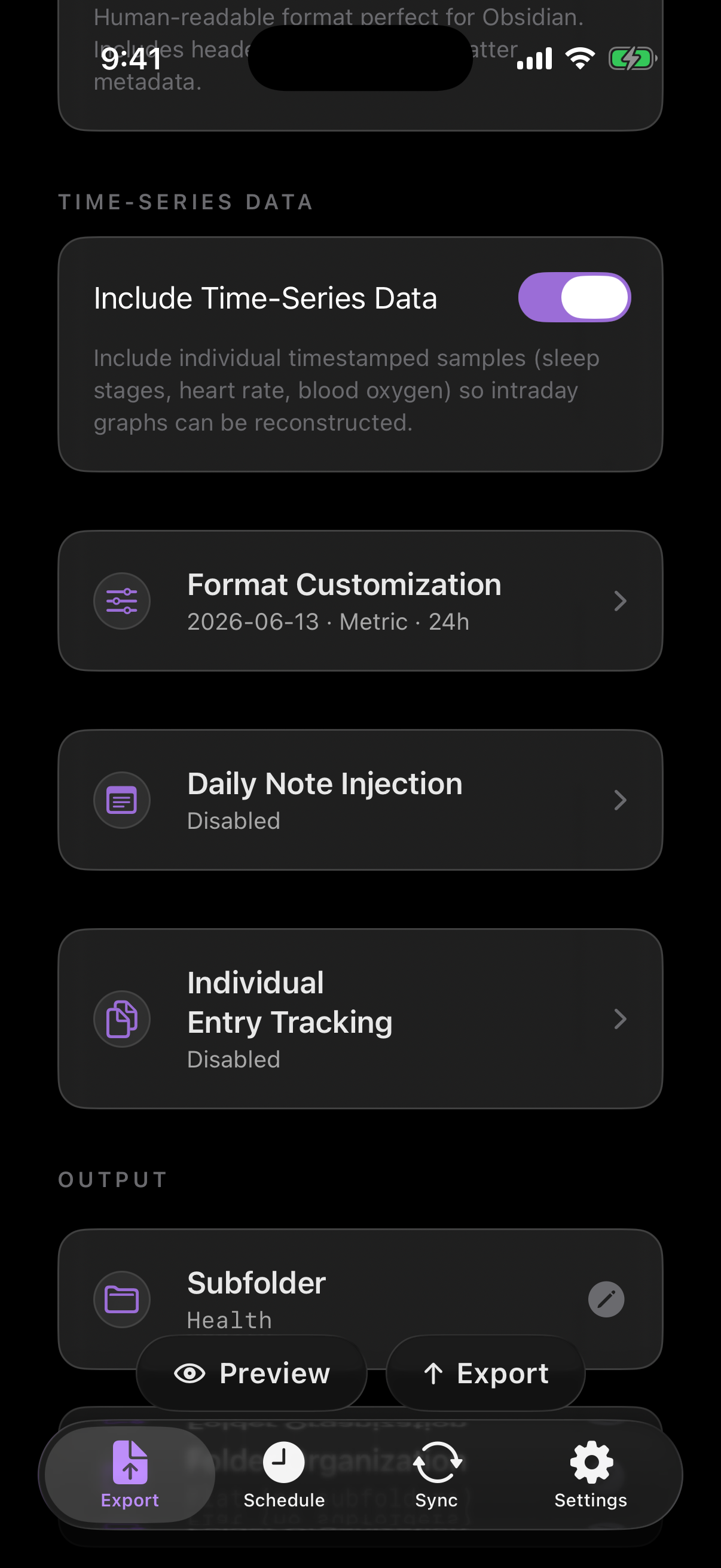
- Optionally enable Daily Note Injection to merge metrics into existing daily notes.
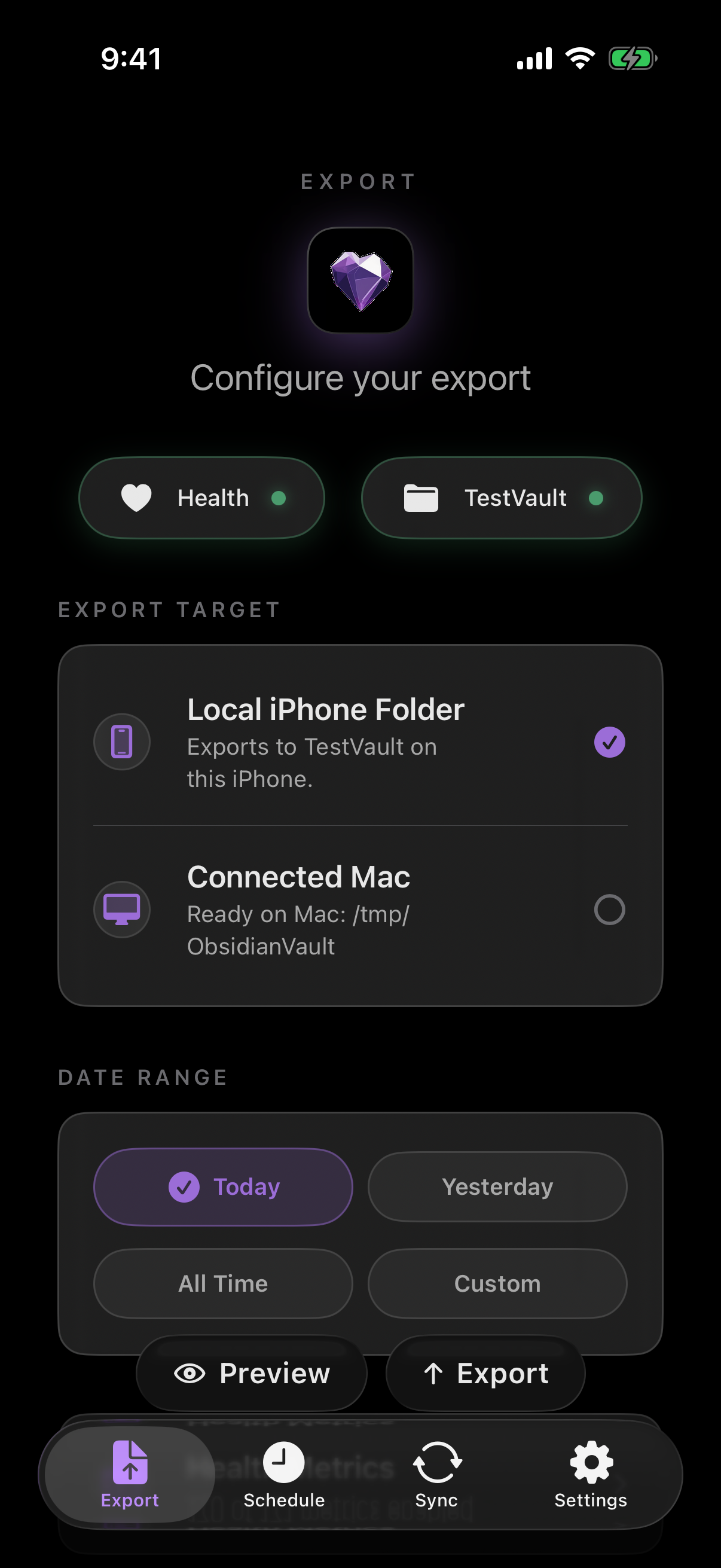
Choose an Obsidian destination
Health.md writes to folders you choose. That can be an Obsidian vault in iCloud Drive, an on-device folder, a file-provider location, or a Mac destination when you use the companion app. The iPhone remains the HealthKit source; the Mac workflow is only a local destination for files that are configured and prepared from the iPhone.
A common vault layout is simple:
Obsidian Vault/
  Health/
    2026-06-13.md
    2026-06-14.md
  Daily/
    2026-06-13.md
The Health/ folder is useful for full daily exports. The Daily/ folder is useful when you want selected metrics merged into notes you already write by hand.
Pick the right export format
Health.md supports four daily export formats, and you can enable more than one.
| What you want | Choose | What it produces |
|---|---|---|
| Read health summaries beside your journal | Markdown | A daily note with selected metrics and readable sections |
| Filter and compare notes in Obsidian Bases | Obsidian Bases | A generated note containing structured frontmatter properties |
| Process data in scripts | JSON | Structured daily data and optional canonical source records |
| Build charts in a spreadsheet | CSV | Metric rows with values and units; see the CSV walkthrough |
Updating a daily note you already write is a separate choice: use Daily Note Injection below. A Bases export creates a frontmatter file; it does not build a Bases view for you.
The following is a synthetic excerpt of the production-generated Apple v8 Markdown example. It shows selected properties, not a complete export or a person's health data. Your enabled metrics and formatting settings determine the output.
---
date: 2026-03-15
type: health-data
resting_heart_rate: 58
sleep_total_hours: 7.75
steps: 12500
---
An Obsidian Bases export stores selected metrics as frontmatter properties. Fields such as steps, sleep_total_hours, and resting_heart_rate remain numeric so you can use them in Bases views.
In Obsidian, create a Bases view scoped to your health-note folder and add the properties you want as columns. Keep numbers numeric; the unit for sleep_total_hours is hours and resting_heart_rate is beats per minute. See the format reference for units and omission rules before building calculations.
JSON exports include top-level fields such as date, type, and units, followed by category objects like activity, sleep, heart, vitals, and workouts. CSV exports use the Date,Category,Metric,Value,Unit,Timestamp header. Value contains numbers and nonnumeric metadata or status values, so filter by Category, Metric, and Unit before numeric analysis. Some summary rows have five fields without Timestamp; timestamped samples have all six. See the producer-generated CSV row contract for exact row shapes.
Use Daily Note Injection for journal workflows
Daily Note Injection is for people who already live in daily notes. Instead of creating only separate health files, Health.md can merge selected metrics into the YAML frontmatter of an existing note such as Daily/2026-06-13.md.
Set up one existing daily note
- Back up your vault and choose one date for the first run.
- In Daily Note Injection, set Folder to your vault-relative daily-note folder, such as
Daily, and Filename to your existing naming pattern. Use{date}for2026-06-13.md; omit the extension in the setting. - Leave Create note if missing off if Obsidian or Templater creates your notes. Turn it on only if you want Health.md to create missing notes.
- Choose the metrics in Health Metrics and review the frontmatter preview. Leave Inject metric sections off for a frontmatter-only update.
- Export that one date. Open the matching note in Obsidian and verify that its health properties updated and your writing is still present.
The Daily Note Injection reference lists filename placeholders and merge behavior.
This illustrative daily note uses synthetic values. It combines your writing with health properties; it is not a complete schema fixture:
---
date: 2026-06-13
steps: 12642
sleep_total_hours: 7.31
resting_heart_rate: 58
---

# Saturday

Morning notes, workout reflections, meals, symptoms, or anything else you track.
If the daily note already has frontmatter, Health.md preserves your keys and updates the fields it owns. If you enable body sections, the app-managed health sections are replaced cleanly on each export so repeated exports remain idempotent.
Decide which metrics belong in your vault
The production-generated Health.md catalog documents hundreds of summary and source-record definitions. Availability depends on the app build, operating system, permissions, and records actually returned. A registry entry is not a promise that every source is readable: current Apple App Store builds do not request historical clinical records. You can select a few properties or include sleep stages, heart-rate samples, workouts, vitals, nutrition, symptoms, and supported source archives; inspect capture status and warnings when completeness matters.
A good starting set for Obsidian is:
- Activity: steps, walking/running distance, active energy, exercise time.
- Sleep: total sleep, bedtime, wake time, deep sleep, REM sleep.
- Heart: resting heart rate, average heart rate, heart rate variability.
- Workouts: workout count, duration, distance, and workout details.
- Mindfulness or symptoms: useful if they already support your journal workflow.
Keep it local-first
Health.md is designed around files you control. HealthKit reads happen on your Apple devices, and the exported Markdown, Bases, JSON, and CSV files land in the folder you choose. This Obsidian folder workflow does not require a Health.md cloud account or create a Health.md server copy. If you send exports to a Mac, the Mac acts as a local destination rather than a remote health-data service.
A separate, optional single-owner Health.md Cloud pilot retains API exports intentionally uploaded to it, subject to its quota. There is no public signup and no automatic device sync; this Obsidian folder workflow does not upload to it. The pilot is unbacked, retains accepted revisions without an age cutoff, and erases stored data asynchronously after account deletion disables access. See the privacy policy for retention, deletion, and loss risks.
That local-first shape matters for health data. You can back up the vault, sync it with the provider you already trust, version it with your own tools, or delete the exported files without asking a service to remove your account.
Troubleshooting notes
- If exports are empty, review Health.md’s Health permissions, selected categories, date range, and capture warnings. Empty output alone does not prove that the source contains no records.
- If last night's sleep is missing, check the local noon-to-noon sleep journal window. Monday night belongs to Monday, including bedtime after midnight on Tuesday. See sleep-date attribution.
- Check that your watch or source app has synchronized and that the selected day contains the metric. An absent value is not a measured zero.
- If Obsidian does not see the files, confirm the destination folder is inside the vault Obsidian is opening on that device.
- If you use scheduled exports, remember that iOS background refresh is opportunistic. Treat the scheduled time as a target, not a guarantee.
- If you need database-style views, enable Obsidian Bases or keep Markdown frontmatter enabled so properties are queryable.
What to read next
Want to explore first? Download the free starter vault. Ready for your own notes? Get Health.md for iPhone and verify one day before setting up a schedule. For exact field names and merge behavior, use the references below.