Start with one day
From your health apps to a file you can open
Your source app or wearable writes records into Health Connect. Health.md reads the categories you authorize, then writes the selected export to your chosen folder. It cannot export a record that never reached Health Connect.
Install and authorize
Install Health.md and open Health Connect setup. Grant only the categories you want to read. In the source app, enable writing to Health Connect and let its data synchronize.
Choose and preview
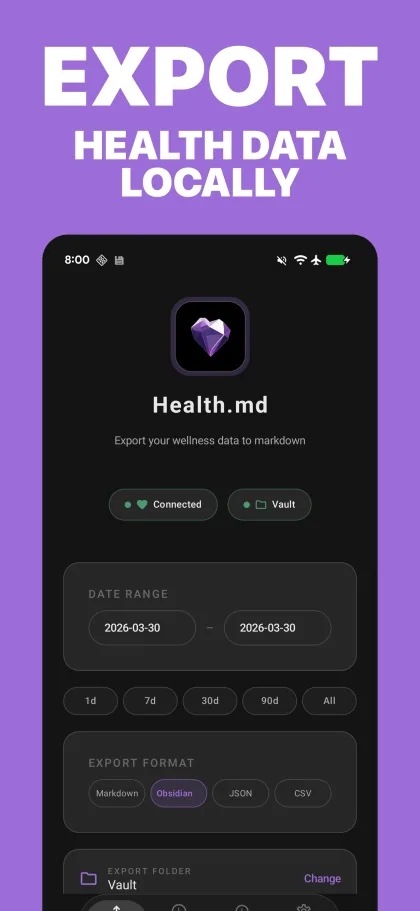
Select metrics, a single date with known data, and CSV, JSON, Markdown, or Obsidian Bases. Preview the output before writing files.
Export and verify
Choose a writable folder through Android's folder picker and export. Review the result, open the destination, and compare the date, values, and units with the source.
Follow the Android setup guide for permissions, destination options, and automation details. This page covers the Health Connect folder workflow.
Your health data.
Your choice of files.
Choose metrics for the task, preview the format, and keep the resulting files in the destination you selected.
CSV for spreadsheets
Import metric rows into Excel, Google Sheets, or Numbers. Inspect Category, Metric, and Unit before charting Value; metadata and status rows are not measurements.
JSON for scripts
Use structured daily data in your own tools. Android source profiles differ from Apple profiles; do not assume identical fields or source records.
Markdown for reading
Keep daily health summaries beside journal entries, training notes, and the files you already use.
Obsidian Bases for views
Export frontmatter properties, then configure your own view in Obsidian. Follow the Health Connect to Obsidian walkthrough.
Inspect the output first
A small Android CSV example
Synthetic excerpt from the Android renderer's frozen compatibility fixture. These are fictional activity values, not a person's records or a complete export.
Date,Category,Metric,Value,Unit,Timestamp
2026-03-15,Activity,Steps,12345,count,
2026-03-15,Activity,Walking Running Distance,9500.5,meters,
Download this synthetic CSV excerpt and try your spreadsheet importer. The final Timestamp cell is empty because these rows are daily summaries. Your selected profile, units, metrics, and detail settings determine the full output.
Daily exports create separate files for the selected days. Check the format guide and platform differences before combining Android and Apple data. The Apple-only Lossless Health Records archive is not an Android export mode.
When something is missing
Check source data, history access, and the destination
- Missing records: check the source app's Health Connect write permissions, synchronization, selected day, and Health.md read permissions. An empty value does not prove that no event occurred.
- Older dates: Health Connect restricts historical reads unless additional history access is available and granted. The default window is up to 30 days before permission was first granted, not a promise that only the latest 30 days can be exported. See Google's history access documentation.
- Overnight sleep: Health.md assigns a sleep session to the day it started. On Tuesday morning, select Monday to inspect Monday night's sleep. See sleep dates and daily notes.
- Writing fails: reselect a folder that grants persistent write access. A sync provider that does not expose a writable folder cannot be used directly; export locally and sync with a tool you choose.
For source synchronization issues, see Google's Health Connect troubleshooting guide. Once a manual export works, the Android scheduling guide explains alarms, background access, and recovery.
Choose your Android channel
Google Play or F-Droid
Google Play
Try 5 manual export actions, then unlock with one lifetime purchase through Google Play Billing. Scheduled exports require that entitlement. The store shows the current localized price.
Get Health.md on Google PlayF-Droid
Unlimited Health Connect exports and scheduling are included without billing. This channel is limited to Health Connect and does not include direct cloud-provider OAuth or Health.md telemetry.
Get Health.md on F-DroidThe channels use different signing keys. Switching requires uninstalling and does not migrate settings, history, purchases, credentials, or private transfer state. Exported files remain in the destination you chose.
Your chosen destination
Local folder exports by default
This workflow reads Health Connect on your Android device and writes to the folder you authorize. It requires no Health.md account and creates no Health.md server copy by default. A synced folder follows the provider's own terms.
The separate, optional single-owner Health.md Cloud pilot retains only API exports intentionally uploaded to it. There is no public signup and no automatic device sync; this folder workflow does not upload to it. Read the privacy policy for retention, deletion, and storage limits.
Common questions
Health Connect export questions
What do I need to export Health Connect data?
Use Health.md on Android 9 or newer, a device with Health Connect available, and data already written to Health Connect. Grant read access to the categories you want and choose a writable destination folder.
Can I export data from my watch or another health app?
Only records that the source app or device has made available in Health Connect can appear in this workflow. Enable Health Connect writing in that source app, let it synchronize, and check the data in Health Connect before exporting.
Can I export more than 30 days of history?
Older records depend on Health Connect history access, platform support, and the permissions granted to Health.md. A longer date range cannot bypass those limits or recover data that the source never wrote to Health Connect.
Can I save to Obsidian or a synced folder?
Yes, when Android's folder picker exposes the destination and grants persistent write access. If your provider does not offer a writable folder, export locally and let your chosen sync tool move the files.
Is Health.md for Android free?
Google Play includes 5 free manual export actions, followed by a one-time lifetime purchase with no subscription. F-Droid includes unlimited Health Connect exports without billing. The channels use different signing keys; switching requires uninstalling and does not migrate app state or purchases.
Does this export upload my health data to Health.md?
This Health Connect folder workflow reads on your device and saves to the folder you choose. It does not create a Health.md server copy by default. A synced folder follows its provider's terms. The separate optional single-owner cloud pilot retains only intentionally uploaded API exports, with no public signup and no automatic device sync.
Are Android and Apple exports identical?
Both platforms support CSV, JSON, Markdown, and Obsidian Bases workflows, but available records, source statistics, and export profiles differ. Android does not provide the Apple-only Lossless Health Records archive. Check the platform guide before combining exports.
Your first useful file
Export one day, then build your workflow
Get Health.md on Google Play, authorize the data you need, and verify a small manual export before backfilling history or adding a schedule.
Keep going with Obsidian on Android or the Android documentation. Using an iPhone instead? Follow the Apple Health export guide.